How to create a playbook and binding
This guide walks through authoring an Anything CLI playbook (your business vocabulary) and
bindings (where each concept lives in your databases, files, or SaaS apps). Based on the
walkthrough in ag-cli/playbooks/README.md.
Authoring with an AI agent via MCP? See the
MCP playbook authoring guide
for the standard tool sequence and visual flow.
crm-payroll-access, entities like
crm_user, and relationships like owns_account ship so you can try the stack quickly.
Your playbooks can model any domain with your own names and sources.
Agents query through the playbook; adapters run at each source — data never moves.
Use the step-by-step playbook generator →
Create playbooks via MCP — tool sequence & visual flow →
Structure diagram
For the demo playbook crm-payroll-access, CRM entities route to the
postgres source key and payroll records route to csv. You author one JSON
playbook plus one binding YAML per distinct source key. Credentials live in the profile — bindings
reference them with source_id.
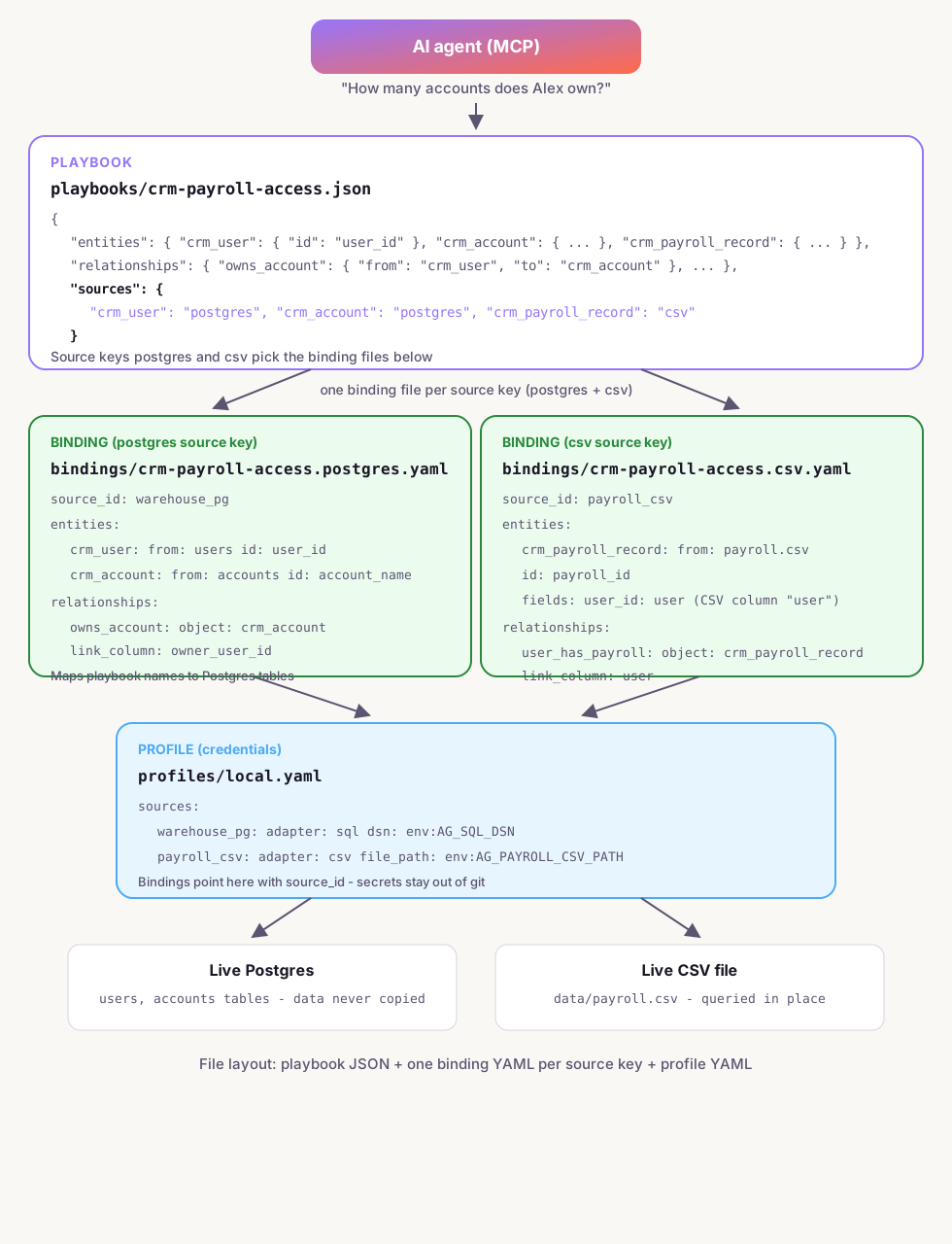
Example layout:
playbooks/crm-payroll-access.json ·
bindings/crm-payroll-access.postgres.yaml ·
bindings/crm-payroll-access.csv.yaml ·
profiles/local.yaml.
Entities that share a source key live in the same binding file.
| File | Purpose |
|---|---|
playbooks/crm-payroll-access.json |
Business vocabulary, relationships, sources routing, optional access |
bindings/crm-payroll-access.postgres.yaml |
Maps crm_user and crm_account to Postgres tables; sets source_id: warehouse_pg |
bindings/crm-payroll-access.csv.yaml |
Maps crm_payroll_record to CSV columns; sets source_id: payroll_csv |
profiles/local.yaml |
Adapter type + credentials (DSN, file paths, tokens) |
Demo playbooks in the repo
Use these as reference when writing your own. Setup and MCP usage: full docs.
| Playbook id | Sources |
|---|---|
simple-crm-access | Postgres |
crm-payroll-access | Postgres + CSV (federated) |
salesforce-lead-access | Salesforce (User + Lead) |
The walkthrough below uses crm-payroll-access — playbook JSON plus
crm-payroll-access.postgres.yaml and crm-payroll-access.csv.yaml bindings.
Three pieces you author
| Artifact | Path | Role |
|---|---|---|
| Playbook | playbooks/<id>.json |
Business vocabulary, relationships, routing, optional access rules |
| Binding | bindings/<playbook_id>.<source>.yaml |
Maps playbook entities to tables, files, or Salesforce objects for one source |
| Profile | profiles/local.yaml |
Named connection credentials — referenced by binding source_id |
1 Playbook JSON — what you model
A playbook describes entities, how they relate, which source each entity lives on, and which binding file handles each source. Field names in the playbook are the stable vocabulary agents use; physical column names are mapped in binding YAML.
| Block | Purpose |
|---|---|
id, name, description | Playbook identity |
entities[] | Things in your domain and their logical fields |
entity_relationships[] | How entities connect (subject → object) |
entity_sources | Which source key each entity lives on (postgres, csv, …) |
bindings | Maps source keys → binding file stems (no .yaml) |
relationship_access_rules | Optional ReBAC; set "active": true to enforce |
Example playbook (demo — federated Postgres + CSV)
{
  "id": "crm-payroll-access",
  "name": "CRM + payroll access",
  "description": "Users, accounts in Postgres; payroll in CSV.",
  "entities": [
    {
      "name": "crm_user",
      "display_name": "CRM user",
      "fields": [
        { "field_name": "user_id", "field_type": "TEXT", "is_identifier": true },
        { "field_name": "full_name", "field_type": "TEXT" }
      ]
    },
    {
      "name": "crm_account",
      "display_name": "Account",
      "fields": [
        { "field_name": "account_name", "field_type": "TEXT", "is_identifier": true },
        { "field_name": "industry", "field_type": "TEXT" }
      ]
    },
    {
      "name": "crm_payroll_record",
      "display_name": "Payroll record",
      "fields": [
        { "field_name": "payroll_id", "field_type": "TEXT", "is_identifier": true },
        { "field_name": "user_id", "field_type": "TEXT" }
      ]
    }
  ],
  "entity_relationships": [
    {
      "relationship_name": "owns_account",
      "subject_entity_name": "crm_user",
      "object_entity_name": "crm_account"
    },
    {
      "relationship_name": "user_has_payroll",
      "subject_entity_name": "crm_user",
      "object_entity_name": "crm_payroll_record"
    }
  ],
  "entity_sources": {
    "crm_user": "postgres",
    "crm_account": "postgres",
    "crm_payroll_record": "csv"
  },
  "bindings": {
    "postgres": "crm-payroll-access.postgres",
    "csv": "crm-payroll-access.csv"
  }
}relationship_access_rules with "active": true
and allow rules that walk entity_relationships paths. See
playbooks/crm-payroll-access.json in the repo for a full example, or
ReBAC in the docs.
2 Binding YAML — where data lives
Each binding file covers one source. It declares:
- The adapter (
sql,mysql,mssql,csv,soql,mongodb,rest, …) - A profile source via
source_id - How each playbook entity maps to a table or file
- Relationships with a link column for per-subject counts and lists
You usually do not write SQL for lookups or counts. With from,
id_field, fields, and subject_link_column, the runtime compiles queries
automatically.
Postgres binding
bindings/crm-payroll-access.postgres.yaml
adapter: sql
playbook_id: crm-payroll-access
source_id: warehouse_pg

entities:
  crm_user:
    from: users
    id_field: user_id
    fields:
      user_id: user_id
      full_name: full_name

  crm_account:
    from: accounts
    id_field: account_name
    fields:
      account_name: account_name
      industry: industry

relationships:
  owns_account:
    join:
      from_entity: crm_user
      to_entity: crm_account
      on: "accounts.owner_user_id = users.user_id"
subject_link_column: owner_user_idfrom— physical table namefields— playbook field → column name (left = logical, right = physical)subject_link_column— on the object table, column pointing at the subject’s id
CSV binding
bindings/crm-payroll-access.csv.yaml
adapter: csv
playbook_id: crm-payroll-access
source_id: payroll_csv

entities:
  crm_payroll_record:
    from: payroll.csv
    id_field: payroll_id
    fields:
      payroll_id: payroll_id
      user_id: user          # playbook user_id → CSV column "user"
      pay_period: pay_period
      gross_pay: gross_pay

relationships:
  user_has_payroll:
    join:
      from_entity: crm_user
      to_entity: crm_payroll_record
      on: "payroll.user = user.user"
    subject_link_column: user
When the CSV column name differs from the playbook (e.g. column user vs field
user_id), map it in fields — left side is playbook field, right side is physical
column.
Salesforce binding
bindings/salesforce-lead-access.salesforce.yaml
adapter: soql
playbook_id: salesforce-lead-access
source_id: salesforce_main

entities:
  crm_user:
    from: User
    id_field: Id
    fields:
      user_id: Id
      full_name: Name

  crm_lead:
    from: Lead
    id_field: Id
    fields:
      lead_id: Id
      lead_name: Name

relationships:
  assigned_to:
    join:
      from_entity: crm_user
      to_entity: crm_lead
      on: "Lead.OwnerId = User.Id"
    subject_link_column: OwnerId
    operations:
      count_for_subject: "SELECT COUNT() FROM Lead WHERE OwnerId = :subject_id"
list_for_subject: "SELECT Id, Name FROM Lead WHERE OwnerId = :subject_id LIMIT :limit"from— Salesforce object API name (User,Lead, …)- Use explicit SOQL for count/list when needed (
COUNT()returnstotalSize, not row aggregates) - MCP:
introspect_source(source_id=salesforce_main)describes objects; optionalschema_name=User,Leadto limit scope
MySQL binding
Same shape as Postgres — set adapter: mysql and map tables/columns. SQL is compiled for MySQL dialect.
Example binding
adapter: mysql
playbook_id: your-playbook-id
source_id: mysql_main

entities:
  crm_user:
    from: users
    id_field: user_id
    fields:
      user_id: user_id
      full_name: full_name

relationships:
  owns_account:
    join:
      from_entity: crm_user
      to_entity: crm_account
      on: "accounts.owner_user_id = users.user_id"
    subject_link_column: owner_user_id
SQL Server binding
Same shape as Postgres/MySQL — set adapter: mssql. Profile dsn uses a JDBC connection string (tiberius).
Example binding
adapter: mssql
playbook_id: your-playbook-id
source_id: mssql_main

entities:
  crm_user:
    from: users
    id_field: user_id
    fields:
      user_id: user_id
      full_name: full_name
MongoDB binding
Set from to a collection name. The runtime compiles find/count operations from your field mappings.
Example binding
adapter: mongodb
playbook_id: your-playbook-id
source_id: mongodb_main

entities:
  crm_user:
    from: users
    id_field: user_id
    fields:
      user_id: user_id
      full_name: full_name

relationships:
  owns_account:
    join:
      from_entity: crm_user
      to_entity: crm_account
      on: "accounts.owner_user_id = users.user_id"
    subject_link_column: owner_user_id
Profile needs dsn (MongoDB URI) and optional database.
REST binding
Set from to an API path (e.g. /users). The runtime compiles GET request templates; profile needs base_url and optional auth (Bearer token).
Example binding
adapter: rest
playbook_id: your-playbook-id
source_id: rest_api

entities:
  crm_user:
    from: /users
    id_field: user_id
    fields:
      user_id: user_id
      full_name: full_name

relationships:
  owns_account:
    join:
      from_entity: crm_user
      to_entity: crm_account
      on: "accounts.owner_user_id = users.user_id"
    subject_link_column: owner_user_id
REST responses should be JSON objects or arrays (or wrap rows in a data / items field).
3 Profile — credentials
profiles/local.yaml registers named sources referenced by each binding’s source_id.
Credentials never go in playbooks or bindings — use env: references.
profiles/local.yaml
sources:
  warehouse_pg:
    adapter: sql
    dsn: env:AG_SQL_DSN
  mysql_main:
    adapter: mysql
    dsn: env:AG_MYSQL_DSN
  mssql_main:
    adapter: mssql
    dsn: env:AG_MSSQL_DSN
  mongodb_main:
    adapter: mongodb
    dsn: env:AG_MONGODB_URI
    database: env:AG_MONGODB_DATABASE
  rest_api:
    adapter: rest
    base_url: env:AG_REST_BASE_URL
    auth: env:AG_REST_TOKEN
  payroll_csv:
    adapter: csv
    file_path: env:AG_PAYROLL_CSV_PATH
  salesforce_main:
    adapter: soql
    instance_url: env:AG_SF_INSTANCE_URL
    auth: env:AG_SF_ACCESS_TOKEN
Set environment variables before starting the stack:
export AG_SQL_DSN="postgres://user:pass@localhost:5432/yourdb"
export AG_MYSQL_DSN="mysql://user:pass@localhost:3306/yourdb"
export AG_MSSQL_DSN="jdbc:sqlserver://localhost:1433;databaseName=yourdb;user=sa;password=YourPassword"
export AG_MONGODB_URI="mongodb://localhost:27017"
export AG_MONGODB_DATABASE="yourdb"
export AG_REST_BASE_URL="https://api.example.com"
export AG_REST_TOKEN="your_bearer_token"
export AG_PAYROLL_CSV_PATH="$(pwd)/data/payroll.csv"
export AG_SF_INSTANCE_URL="https://your-org.my.salesforce.com"
export AG_SF_ACCESS_TOKEN="your_access_token"
Full adapter list and introspection notes: Data adapters (docs).
Override the profile path with AG_PROFILE_PATH if needed.
4 File layout
Keep playbook, bindings, and profile paths aligned:
playbooks/crm-payroll-access.json
bindings/crm-payroll-access.postgres.yaml
bindings/crm-payroll-access.csv.yaml
profiles/local.yaml
The binding file stem must match the playbook’s bindings map — e.g. key postgres
→ stem crm-payroll-access.postgres → file crm-payroll-access.postgres.yaml.
5 Validate and test
From the ag-cli repo root:
cargo run -p anythinggraph-ag -- validate --playbooks playbooks
./start-all.sh
Test with a direct HTTP query (demo playbook):
curl -s http://127.0.0.1:8787/query \
  -H 'Content-Type: application/json' \
  -d '{
    "playbook_id": "crm-payroll-access",
    "resolve": { "entity": "crm_user", "by_name": "Alex Anderson" },
    "count": { "relationship": "owns_account", "object_entity": "crm_account" }
}'binding_name on queries — the runtime picks the binding from entity_sources +
bindings based on the object entity.
Or ask via MCP query_graph — resolve a user by name, then count a relationship.
Agent-assisted mapping
You can map a new playbook to your data with an AI agent through MCP instead of writing YAML by hand. See the dedicated MCP playbook authoring guide for the full tool sequence and visual flow.
list_sources→get_adapter_guide→introspect_sourcepropose_playbook→save_playbook(new playbooks)get_playbook_context→suggest_bindingspropose_binding→test_binding→save_bindingquery_graph— verify end-to-end
Using anythinggraph-thin MCP: load playbook <your-playbook-id>, inspect my data
source, suggest how to map entities to my tables, test the binding, and save it.
Full MCP tool reference: MCP setup & usage · step-by-step MCP authoring →